Some products are bought once. Others run out. Coffee, supplements, skincare, pet food, and household supplies all get used up, which means the customer will need more. Stores that sell these products have a built-in opportunity: if you time your reminders well, one-time buyers become regular customers.
The challenge is knowing when each customer is due, who has paused, who has cancelled, and why. Spreadsheets and disconnected tools make this hard. This guide explains how to track repeat purchases and subscriptions in a CRM, and how that helps you reduce churn.
Repeat purchase and subscription: two related ideas
A repeat purchase is any additional order from a returning customer. A subscription is a commitment to receive a product on a schedule, often with a discount or convenience. Some stores run true subscriptions, some rely on replenishment reminders, and many use both.
Either way, the core need is the same: know when each customer is likely to run out, remind them at the right time, and understand what happens when they stop.
Predict when each customer will need more
The most useful data point in a replenishment business is the expected reorder date. You can estimate it from the product's typical usage time and the customer's own order history. A customer who buys a one-month supply is due around a month later, and someone who has ordered on a steady rhythm before is easy to predict.
- Store the product's typical usage period, such as the number of days a bag or bottle lasts.
- Calculate an expected reorder date for each customer from their last order.
- Show a list of who is due this week, by product, so the team knows what is coming.
- Adjust the estimate using each customer's real ordering pattern over time.
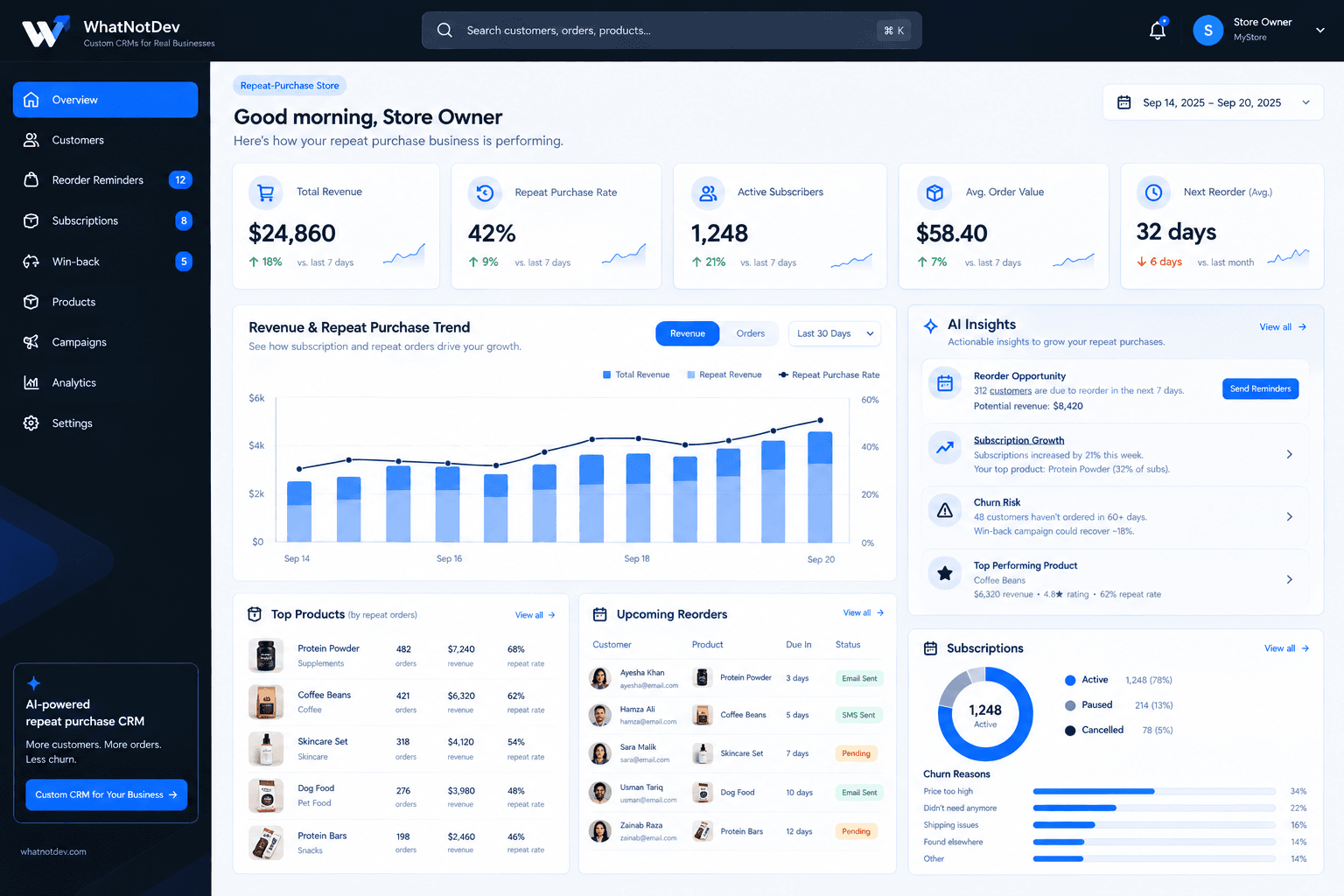
Our sample project for Daily Provisions Co. shows an upcoming reorders list and a reminder status for each customer. It uses illustrative data, not a real client result.
Send reminders that feel helpful
A reminder should arrive just before the customer runs out, not after they have already bought elsewhere. Email and SMS both work, and many stores use both, depending on customer preference and consent.
- Send the reminder a few days before the expected reorder date.
- Make reordering one click, with the same product and address ready to confirm.
- Offer easy ways to change the delivery timing or skip a shipment.
- Record whether the reminder went out and whether it led to an order.
Track subscription status clearly
Subscription businesses need a clean view of who is active, paused, and cancelled. Each status calls for a different response. Active customers may be eligible for loyalty rewards. Paused customers often need a gentle nudge before the pause ends. Cancelled customers are candidates for a win-back message once you understand why they left.
Watch for early warning signs
- A customer skipping several shipments in a row.
- A long gap since the last order compared with their normal rhythm.
- A support complaint about shipping, quality, or a billing problem.
- A failed payment, which can cause churn even when the customer wants to stay.
Understand why customers leave
You cannot reduce churn without knowing its causes. When someone cancels, ask why, using a short list of reasons plus an optional comment. Typical categories include price, not needing the product anymore, shipping problems, and switching to another brand. The exact list should reflect your business.
Once you have a few weeks of answers, patterns appear. If many people cite shipping, that is an operations problem, not a marketing one. If many cite price, you might test a lower-frequency plan. Recording cancellation reasons in the CRM turns anecdotes into something you can act on.
Voluntary and involuntary churn
Churn comes in two forms. Voluntary churn is when a customer chooses to leave. Involuntary churn is when a subscription ends because a payment failed. The second kind is often the easier one to fix, with clear payment-failure notices, a grace period, and a simple way to update card details. Track the two separately so you know which problem you have.
Connect it to win-back and repeat purchase analytics
When subscription status, order history, and marketing live on the same record, you can build useful views: repeat purchase rate by product, average time between orders, and the share of customers who reorder after their first purchase. You can also trigger win-back campaigns for lapsed customers automatically. Our guide to abandoned cart and win-back flows covers the messaging side.
What a repeat purchase dashboard should show
- Customers due to reorder in the next week, with the product and reminder status.
- Active, paused, and cancelled subscribers at a glance.
- Cancellation reasons, ranked, so you can see what to fix first.
- Top products by repeat orders, so you know what customers come back for.
- Average reorder cycle, and how it changes over time.
Give customers flexible options
Some churn is really a mismatch between how often a customer wants a product and how often you ship it. Offering a longer delivery interval, an easy skip, or a pause instead of a cancel can keep a customer who would otherwise leave.
Make those options visible in the reminder message and on the account page, and record which option each customer chooses so you can see which ones keep people ordering longer.
Test your retention ideas
Treat retention like any other experiment. Try one change at a time, such as an earlier reminder, a different message, or a new pause option, and compare reorder and cancellation rates against customers who did not receive it.
Keep the measures simple and review them monthly. When a change clearly helps, make it the default, and when it does not, drop it and try the next idea.
Getting started
- Decide whether you run subscriptions, replenishment reminders, or both.
- Record a usage period for each product you want to remind on.
- Track subscription status and cancellation reasons in one place.
- Set up one reminder and one win-back message, then measure them.
- Review reasons for churn monthly and act on the biggest one.
A CRM built around repeat purchases connects all of this so nothing depends on someone remembering to check. If you want that for your store, read about our ecommerce CRM development or book a discovery call to talk through your products and customers.