WhatNotDev.com

Custom HVAC CRM for the whole operation, from the first call to the invoice.

WhatNotDev builds custom CRMs for HVAC companies, from a handful of trucks to multi-crew operations. One system tracks every call, estimate, invoice, technician, and part, so your office stops re-entering the same job in three different places. We build on custom code, GoHighLevel, or HubSpot and recommend whichever fits how you actually run.

Start with a custom HVAC CRM for the core operation: estimates, invoicing, dispatch, and inventory. Optional AI workflows can be scoped on top to help organize requests, prepare summaries, or propose the next action, with agreed access and approval rules. The current technician app does not yet include live AI assistance; each agentic capability needs its own implementation and validation. For rule-based follow-ups and reminders, see AI agents & automation.

Comparing options? Start with our guide to what an HVAC CRM is and which features matter, or browse our sample HVAC projects.

Who it's for

Who a custom HVAC CRM is for

A custom HVAC CRM is for service companies that have outgrown spreadsheets, paper job tickets, and a stack of disconnected apps. If your dispatcher juggles texts and a shared calendar, your estimates depend on someone's memory, or you only learn you are low on refrigerant when a technician calls from a job site, you are the kind of business we build for.

It suits residential service and replacement companies, light commercial contractors, and teams managing recurring maintenance. It works whether you have five technicians or fifty, because the goal is the same: one clear picture of the day and of the business.

  • Owners who want revenue, open estimates, and job counts without building reports
  • Dispatchers who need to see which technician is free right now
  • Office staff who re-enter jobs between phone, scheduling, and invoicing tools
  • Companies that tried a generic CRM and found it did not fit HVAC work

The problems

Problems a custom HVAC CRM solves

Missed calls that become lost jobs

In peak season a missed call is often a job that goes to the next company in the search results. A CRM records every call and form, texts back missed callers automatically, and keeps a clear list of who still needs a callback.

Dispatch chaos

When schedules live in texts and a shared calendar, dispatchers spend the day answering where everyone is. Technician scheduling against real availability puts the whole day on one screen.

Estimates that never get followed up

Quotes go out and then sit. A list of open estimates with automatic follow-up reminders means nothing waits unanswered for days, and it shows which quotes are worth a phone call.

Stockouts discovered at the customer's door

Low refrigerant, capacitors, or filters cost a return trip. Inventory tracking with low-stock alerts flags shortages before a truck is dispatched.

No repeat business from past customers

Maintenance plan renewals and seasonal tune-ups are the steadiest work in HVAC. Reminders go out automatically, and customers who have gone quiet are flagged so you can bring them back.

Features

What's inside a custom HVAC CRM

Lead capture and call tracking

Every call, web form, and message lands in one pipeline with its source recorded, plus missed-call text-back.

Estimates and invoices

Create estimates, track their status, and turn approved work into a job and an invoice without retyping anything.

Job and technician scheduling

See who is available, what each technician is qualified for, and how the day is going, with upcoming appointments per technician.

Maintenance plan reminders

Track plan customers, upcoming visits, and renewals, with reminders that send on their own.

Review requests

Ask for a review after a completed job while the experience is fresh, and see which jobs have been asked.

Parts inventory and alerts

Track stock by location, set reorder levels, and get low-stock alerts before a shortage delays a job.

Customer and equipment history

See past jobs, equipment, notes, and balances on one record when a customer calls.

Dashboard for booked jobs and revenue

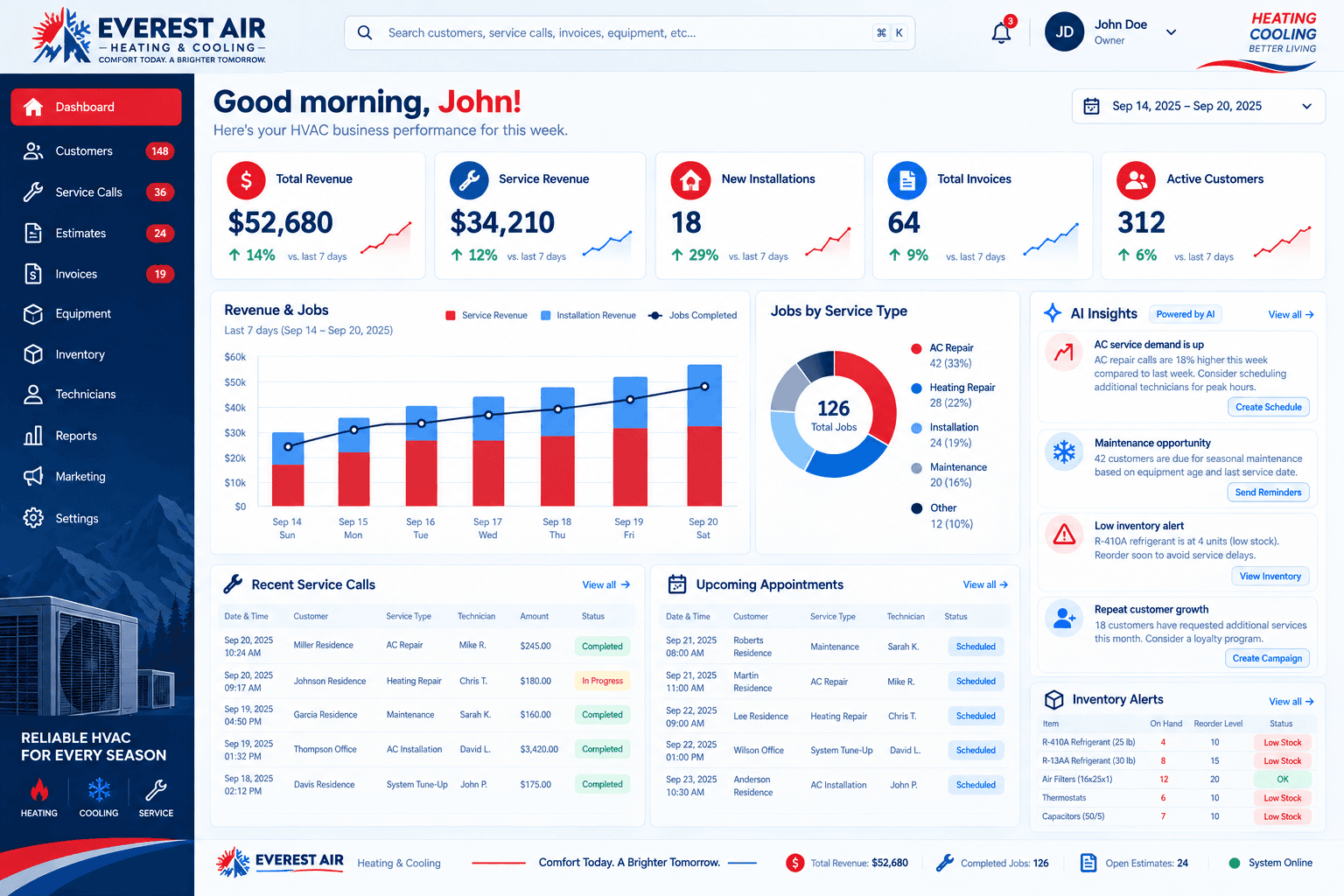
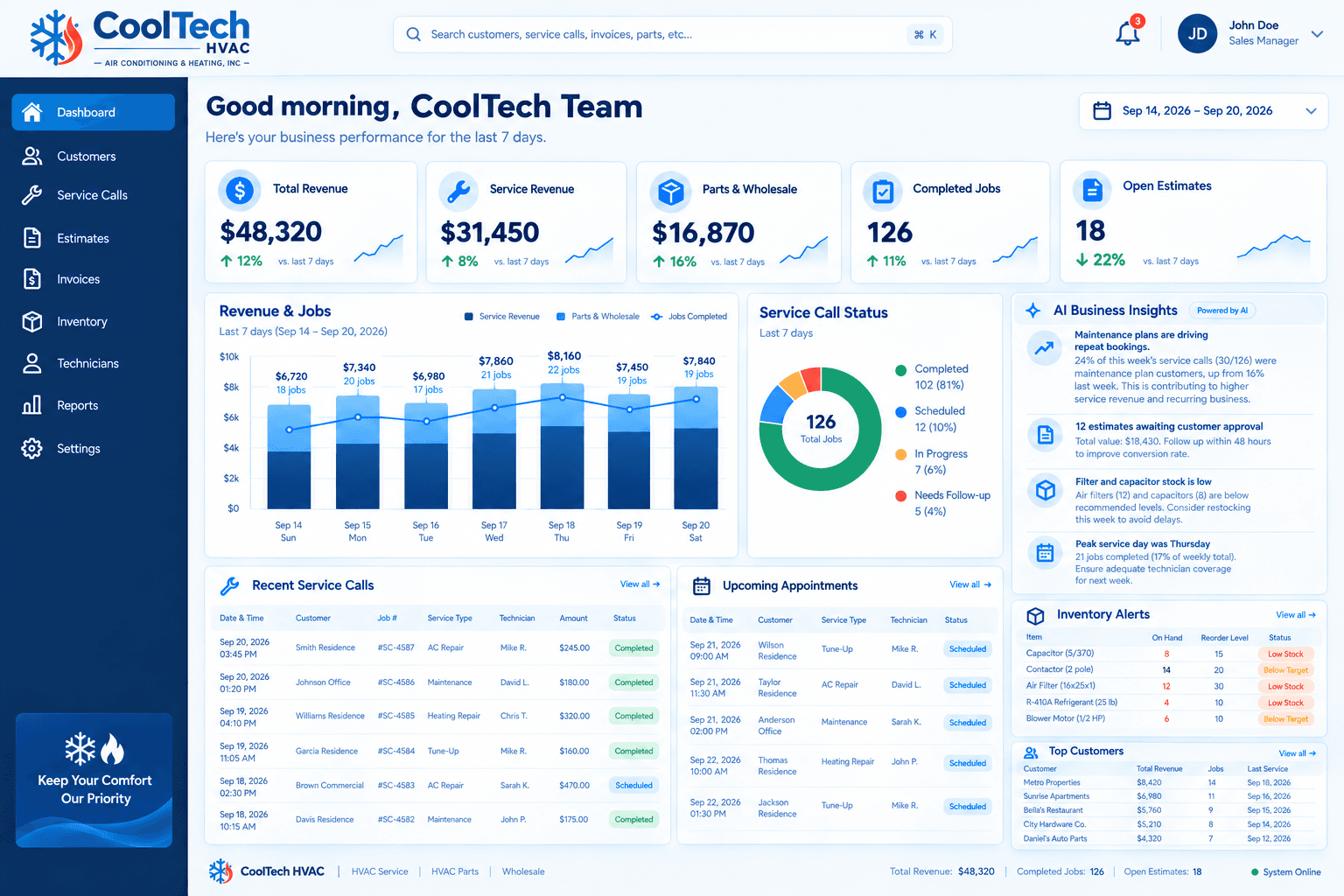
One view of service calls, open estimates, appointments, and revenue split between service and parts.

The full service lifecycle

A custom HVAC CRM that follows the work.

Your process does not end when a lead enters a pipeline. Map the office decisions, technician actions, customer approvals, and records that move a real service call forward.

01

From inquiry to booked service call

Start with the customer, service address, reported problem, source, and requested appointment window. Give the office a place to confirm missing details, assign responsibility, and book the visit. Keep a requested window separate from a confirmed appointment so dispatch works from a schedule the team has actually agreed to.

02

From dispatch to field progress

Assign the call to a technician and keep the job context with that assignment. The connected technician app brings the schedule, customer contact, service history, and work notes into the field. En route, on site, and completion updates give the office a useful record of progress without treating a field update as a sales approval.

03

From diagnosis to an estimate

Keep the technician’s finding, affected equipment, evidence, and suggested scope together. The office reviews the recommendation, confirms prices, and prepares the estimate. Track which option the customer approved, declined, or deferred, with the follow-up context visible to the people responsible for the next step.

04

From completed work to the next visit

Connect the job record to invoicing, customer history, parts use, and future maintenance. Define which records must exist before a job counts as complete. Give owners reporting based on the business events that matter to them: booked calls, open estimates, outstanding work, and revenue, with agreed definitions for each measure.

Optional AI workflows

Put AI around a defined workflow.

Agentic workflows combine your customer and job records with AI that can use approved tools to help complete defined tasks. For an HVAC business, the useful question is which task, which data, and which approval step the assistant should handle.

Availability and scope: Agentic features are optional development scope, agreed and validated for each project. The current technician app’s AI edition does not yet provide live AI assistance. The examples below describe workflows we can discuss building; they are not claims that those agents are already running.

Lead intake assistance

A scoped assistant could organize incoming service requests, identify missing information, and prepare a callback brief for the office. Your team decides which intake sources it can read, which fields it may draft, and when a person must review the result before a customer is contacted.

Estimate follow-up assistance

An assistant could surface open estimates, summarize the latest conversation, and draft the next follow-up. Timing, recipient selection, approval, and sending rules are agreed during scoping. Customer acceptance and the final price remain explicit business decisions recorded in the CRM.

Dispatch preparation

A workflow could collect appointment details, prior service notes, and known equipment into a dispatch summary. Availability and eligibility rules must come from your actual records. A proposed assignment needs a defined approval path; the system should show missing information rather than invent a qualification or promise an arrival time.

Service-record summaries

A scoped assistant could turn existing notes and confirmed job records into a concise office handoff. The original records remain available for review. Field findings, warranty coverage, part compatibility, and customer approvals need their own evidence; generated text does not establish any of them.

Rules first. Assistance second.

A scheduled reminder follows a rule you already chose. An AI assistant can help interpret unstructured notes or prepare a proposed next action. We map that distinction before deciding whether a task needs AI at all. The workflow must still have a named owner, a measurable outcome, and a way to inspect what happened.

Define what an agent may do.

  • Choose the records and connected tools it may access.
  • Separate drafting, recommending, and executing actions.
  • Set review rules for customer messages and financial changes.
  • Agree how actions, exceptions, and failed requests are recorded.
  • Validate the workflow with representative examples before rollout.

Connected around your team

Integrations, permissions, and a usable starting point.

A custom CRM project includes decisions about where customer, accounting, scheduling, and communication records live. We review the tools you already use, available APIs, data ownership, and the steps that currently require someone to copy information between screens. Integrations and ongoing third-party service costs are agreed in the project scope.

A clear view for each role

Define what owners, office staff, dispatchers, and technicians can see and change. Job assignment, financial review, customer decisions, and company settings are different responsibilities. Scope permissions around those responsibilities rather than assuming everyone needs the same screen.

Migration with a review step

Identify which customers, equipment, service history, and open work should move from your existing system. Agree field mappings and duplicate handling, review a sample import, and confirm the launch dataset before your team starts relying on it.

See how the technician app connects

Two connected workspaces

One operation. The right view for every role.

The CRM coordinates the business. The technician app carries the assigned work into the field. Together, they keep the handoff attached to the job.

Custom HVAC CRM and Technician App responsibilities compared
WorkflowCustom HVAC CRMTechnician App
Primary workspaceOwners, dispatchers, sales, and office teamsTechnicians working on assigned service calls
Daily focusLead intake, dispatch, estimates, invoices, and operational oversightAppointments, customer details, work records, and job progress
Information sharedCustomer, service-call, equipment, and job historyThe assigned job and the field records linked to it
Financial responsibilityOffice review of scope, prices, estimates, and billingCapture job findings, materials, and costs for authorized office review
AI scopeOptional agentic workflows designed and validated for your projectCore field tools work independently of planned AI assistance
Getting startedDiscovery, workflow mapping, agreed scope, build, migration, and trainingReview the current build, confirm field requirements, and plan a pilot

How it works

How we build your HVAC CRM

01

Discovery call

A 30-45 minute conversation about how your office runs today: how calls come in, how jobs are scheduled, quoted, and billed, and where things slip.

02

Scope and proposal

Within a few days you get clear deliverables and a timeline, with your project cost set based on scope.

03

Design and build

We build around your workflow over a few weeks and you review progress along the way, with our team working alongside your office staff.

04

Launch and training

We migrate your customers and history, connect your tools, and train your team so the office runs from one screen.

See the full timeline on our how it works page, or read how one dashboard can track service calls, estimates, and invoices.

Platform options

Custom code, GoHighLevel, or HubSpot: which fits an HVAC company?

We build on all three and recommend whichever fits, not whichever is easiest for us to sell. Here is how we think about it for HVAC companies.

Custom code

Built around your workflow, so dispatch, estimates, invoices, and inventory live in one system.

Best when

  • You need scheduling, dispatch, and parts inventory in one screen
  • Your process does not match standard tools and you work around them daily
  • You want dashboards and roles shaped to your team
  • You need accounting, phone, and email connected in specific ways

GoHighLevel

A strong automation platform for lead follow-up, texting, reminders, and appointment booking.

Best when

  • Fast lead response and missed-call text-back are your biggest gaps
  • You want maintenance and review reminders on autopilot
  • You want a quicker setup with less build effort
  • Your scheduling needs are simple

HubSpot

A polished sales and marketing CRM with strong reporting and a large integration ecosystem.

Best when

  • Your work is mostly quoted projects with a longer sales cycle
  • You want marketing and sales reporting in one place
  • You value a big ecosystem and easy hiring of people who know it
  • Field scheduling is handled by another tool

Not sure which fits? That is what the discovery call is for. Read our comparisons of custom CRM vs HubSpot for HVAC companies and custom CRM vs GoHighLevel vs HubSpot, or tell us how you run.

What's included

What you get with WhatNotDev

CRM design and build around your workflow

Setup on custom code, GoHighLevel, or HubSpot, whichever fits

Automations such as missed-call text-back, follow-ups, and reminders

Integrations with accounting, scheduling, phone, and email tools

Migration of customers and history from spreadsheets or your old CRM

Training for your office team and technicians

Support and improvements after launch

Project-based pricing, with the cost agreed on your discovery call

Book a Discovery Call

Fill out the form and hear back the same business day. You can also read more about our CRM development services.

Technician app · In development

The office has a CRM.
Give the field a workspace.

Everything dispatch already knows — the job, the schedule, the customer's history — now fits in a technician's pocket. No calling the office for details that are already on file.

WhatNotDev / Field service

Your day. In hand.

Connected to your HVAC CRM

Today's appointments

2 appointments · Sample schedule

09:00 AMOn site

Jordan Miller

AC diagnostic

11:30 AMScheduled

Alex Carter

Seasonal maintenance

Illustrative preview · Sample data

FAQ

Frequently asked questions

An HVAC CRM is software that keeps your calls, customers, jobs, estimates, invoices, and parts in one connected system. Instead of retyping a job in several tools, your office and technicians work from the same record. Our guide to what an HVAC CRM is covers the features that matter most.

HubSpot and GoHighLevel are strong general platforms, but they are built around sales and marketing. A custom HVAC CRM starts from your workflow, so technician scheduling, dispatch, and parts inventory are part of the system instead of add-ons. We build on all three and recommend whichever fits, as explained in custom CRM vs HubSpot for HVAC companies.

Most projects go live in one to two months from kickoff. That includes design and build, migrating your customers and history, and training your team. See the full timeline on our how it works page.

Yes. We integrate with the tools you already use, including accounting, scheduling, phone, and email, or help you move to a better one. Integrations are scoped on your discovery call.

Yes. We move customers and history from spreadsheets or your current CRM, so your team starts with real data instead of an empty screen.

Every project is different. A CRM is billed on a project basis, with the exact cost set on a free discovery call based on scope, so you only pay for what you need.

It's an optional AI workflow layered onto your CRM's customers, jobs, estimates, and operational records, designed to use approved data and tools for a specific task. Examples to scope include intake summaries, follow-up drafts, and dispatch preparation. Each capability needs defined permissions, review rules, implementation, and validation. Read the agentic workflow examples. For automation that follows fixed rules instead, see AI agents & automation.

No. The current technician app includes Standard and AI edition identities, but live AI field assistance is not implemented. Core field tools do not depend on AI. Agentic development is separate, optional project scope rather than a promise that every workflow already has an autonomous assistant.

A rule-based automation carries out a predefined instruction, such as sending an appointment reminder at an agreed time. An AI workflow may interpret notes or prepare a proposed next action using approved context. We define the task, permitted tools, review points, and expected outcome before deciding whether AI is useful for that workflow.

The technician app project connects assigned service calls, schedules, customer context, field notes, materials, evidence, and office handoffs to the CRM backend. App availability, record types, permissions, offline behavior, and device readiness are reviewed during scoping. Explore the technician app for the current workflow and limits.

Those are explicit workflow decisions. The field handoff keeps findings and proposed scope separate from office pricing and recorded customer approval. For any optional AI integration, we agree which actions can be drafted, recommended, or executed and where a person must approve the next step.

Bring an example of how a call becomes a scheduled visit, an estimate, an invoice, and a maintenance follow-up. List your current tools, office and technician roles, data to migrate, and the tasks you would like to automate. We can then separate the core CRM, integrations, field app, and optional AI scope into a clear proposal.

Book a discovery call

Ready to see what a CRM built for your business looks like?

Book a Discovery Call

Fill out the form and hear back the same business day.